
Why did the Flow win? The Evolution of Salesforce Automation
Automation plays a fundamental role in Salesforce as it allows businesses to optimize processes, increase efficiency, and reduce manual work. Through automation, tasks such as entering data, sending email notifications, updating approvals and records can be performed automatically based on predetermined events. This ensures that operations are done on time, while minimizing the possibility of human error.
Before the release of Flow, automation was implemented in Salesforce with tools such as Workflow Rules and Process Builder. These made it possible to perform various automation tasks, but each of them had its own limitations.
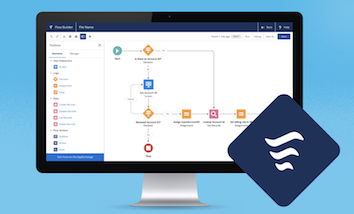
After this, Salesforce Flow entered the picture, which offers a wider functionality in the creation of automated solutions: with the help of the visual interface (Flow Builder), it allows you to create automation without code and is characterized by greater flexibility. The evolution of automation tools in Salesforce
Regole di Workflow:
They were one of the first automation features in Salesforce and for a long time provided a basic automation solution for business processes. For example:
o Refresh fields — the value of a field in a record could be automatically changed after a condition was met.
o Send email notifications — default notifications have been sent to users to external parties.
o Create tasks — new tasks or events could be automatically created for users to complete.
· Limitations:
o Creating Workflow Rules was extremely simple, but could not handle complex logic, such as decisions. He was not able to handle really complicated business processes.
Process Builder
Process Builder appeared as a more advanced tool in Salesforce and offered much more functionality than Workflow Rules. It provided users with the opportunity to form more complex processes, which consisted of several steps, conditional logic and various types of operations.
· Strengths:
o It allowed to perform many operations (updating fields, creating records, starting other processes), all in a user-friendly interface using drag-and-drop technique.
o Create multi-step processes — by performing different operations at the same time
· Limitations:
o Process Builder, like Workflow Rules, was not able to handle more dynamic logic. It could not handle repetitive, iterative operations.
o He had trouble managing large databases and complex systems.
The appearance of Salesforce Flow
What is Salesforce Flow? Salesforce Flow is a tool that has replaced previous tools and that allows us to automate business processes, using drag and drop techniques, without the need to write code. Flow makes it easy to design and execute complex business logic to increase efficiency and improve user experience.
How did Flow replace old tools?
· Salesforce Flow combined previous tools like Workflow Rules and Process Builder into a single, much more flexible platform.
o Allows users to create complex, multi-step processes with a single tool while managing different types of data and performing logical operations.
o Flow also differs from legacy tools in its ability to apply dynamic logic, such as making decisions based on data.
Why is Salesforce Flow better?
Unified automation platform
Salesforce Flow allows users to perform all kinds of automation tasks on a single, integrated platform versus previous tools that offered separate, limited solutions. A unified platform is also beneficial in terms of maintenance and updates, as there is no need to synchronize and manage different devices.
Flexibility and Complexity
· Handling more complex logic and conditions:
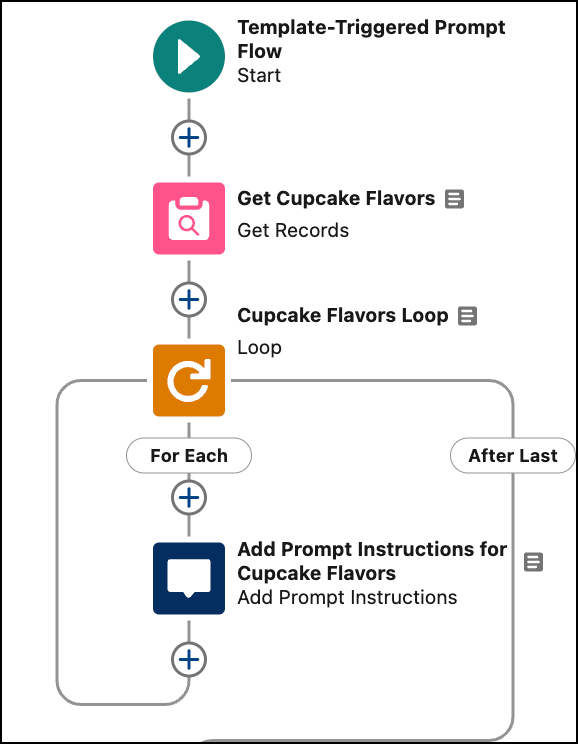
Salesforce Flow allows you to create complex business logic and decision points that were not previously possible, for example, by applying conditional “if—then” rules and multi-branch branching. The use of loops (loops) supports repetitive operations and processing of large amounts of data, such as updating records or bulk data management.
Data management and dynamic operations:
Flow can handle dynamic data and actions, such as when a user enters data on an input screen, and that data influences the next steps. In addition, creating new records, updating data, or integrating with external systems can all be handled with Flow.Simplified user interface
· Flow Builder — Drag-and-drop interface: Salesforce Flow offers a visual, drag-and-drop based Flow Builder interface that allows you to create complex automations without coding. Transparent operation helps to track processes and quickly identify errors, so administrators can effectively manage and fine-tune automations without a developer background.
Power
· Manage large amounts of data and complex operations:
Salesforce Flow can handle more data and more complex operations than previous automation tools, ensuring high performance for large databases. Parallel execution of operations reduces waiting time and significantly increases the efficiency of automated processes.
Integration with other Salesforce features
· Integration with APEX and Lightning components:
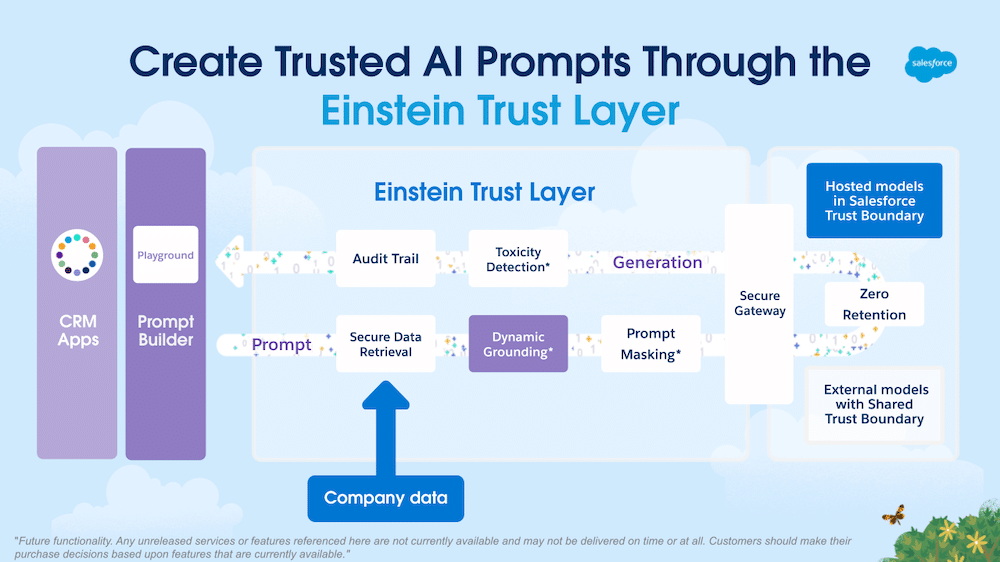
Salesforce Flow integrates seamlessly and works closely with other Salesforce technologies, such as Apex code, Lightning components, and external APIs, enabling complex logic and custom operations. With Apex, Flow can be further customized. In addition, connectivity to external applications and data sources allows you to automate business processes beyond Salesforce. Connecting Salesforce Flow and AI Prompt grounding
In order for an AI model to provide context-specific and accurate answers, it must be provided with data related to the specific business process (e.g. company data, customer data, transaction data). With Flow, it is possible to dynamically supplement prompt templates with relevant data based on decisions and business logic, so that artificial intelligence can already provide an answer to a given situation.
Use Case: Based on the address of a contact person, Flow collects nearby company events, based on which the AI model compiles an email to recommend them to the customer.
Integrating AI into the automated process
With Flow, in addition to automating a complex business process, it is already possible to include in the action queue the invocation of the AI model using prompt templates and the returned response to be used in further process steps.
Automation with intelligent decision making: workflows can not only run according to predefined rules, as AI can interpret and evaluate data in real time, ensuring dynamic, data-driven business processes
Use Case: A customer service report is pre-analyzed and categorized by AI, and Flow can automatically direct it to the right agent.
Processes based on predictive analytics: AI can predict customer behavior, future events based on patterns that Flow can proactively respond to
· Use Case: If the AI detects that a customer's report is similar to previous cases, Flow can automatically recommend a proven solution to the administrator.
Agentforce and Flow
Agentforce, Salesforce's latest AI agent creation platform, is also closely linked to Flow-based automation solutions as it can be a building block for custom-defined Agent operations to implement company-specific business logic in autonomous AI Agent operations.
Use Case-ex:
· A customer writes about an issue in chat, the AI Agent analyzes the content, identifies the topic and Flow immediately starts the appropriate approval or customer service process.
· A customer indicates a problem with his recent order, the AI Agent can request the order in real time using a Flow, the products ordered and the customer can help with this data during the interaction.
Summing up
Salesforce Flow is more advanced, flexible, and easier to use than previous automation tools, Flow's intuitive user interface and powerful customizability allow users to manage complex business logics and workflows without the need for coding skills. This flexibility and simplicity ensures that companies can deploy their automation solutions faster and more efficiently.
The combination of Flow and AI will help companies apply artificial intelligence to their business processes, allowing them to develop autonomous solutions that can adapt to the business environment and proactively respond to change with minimal human intervention.
Sources:
1. Workflow Rules and Process Builder
- Legacy Salesforce Flow Features
2. Salesforce Flow § Flow Builder Basics
- Salesforce Automation Best Practice Guide
- The Ultimate Guide to Flow Best Practices and Standards
3. Salesforce Flow and AI
- Salesforce Artificial Intelligence
- Get Ready for Agentforce





Get in touch


Subscribe to our newsletter
Only valuable content, no spam. Join our IT community!
© 2026 United Consult Zrt.




get in touch
Subscribe to our newsletter!
We are an innovative community who are stick together and belive in development.
© 2026 United Consult Zrt.

Get in touch
Subscribe to our newsletter
Only valuable content, no spam. Join our IT community!
© 2026 United Consult Zrt.
get in touch
Subscribe to our newsletter
Only valuable content, no spam. Join our IT community!
© 2026 United Consult Zrt.
Get in touch
Subscribe to our newsletter
Only valuable content, no spam. Join our IT community!
© 2026 United Consult Zrt.
get in touch
Subscribe to our newsletter!
Only valuable content, no spam. Join our IT community!
© 2026 United Consult Zrt.